

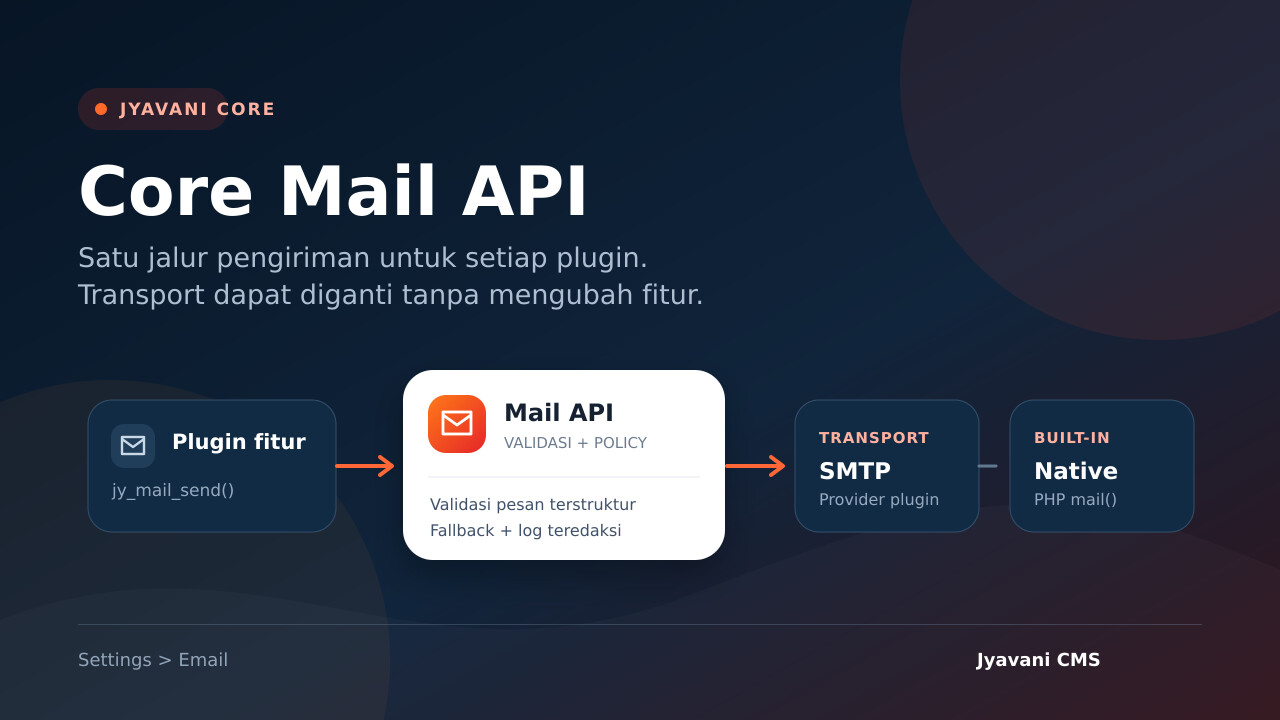
Jyavani Core provides the Mail API as a single email delivery path for CMS features and plugins. Feature plugins only need to pass a structured message to Core; transport selection, sender identity, fallback, and delivery logging are managed separately.
Why use the Mail API
Calling mail(), SMTP, or a provider API directly from each plugin distributes delivery configuration across the system. When the provider changes, each plugin must be adjusted individually. The Mail API separates feature requirements from the way messages are delivered.
- Feature plugins do not need to depend on a specific SMTP plugin.
- The Site Owner can switch transports without changing the calling code.
- Message validation, delivery results, fallback, and logging use the same Core contract.
- Additional transports can be installed or disabled as optional plugins.

Settings under Settings > Email
The Email Delivery page is only available to a Site Owner with access to Core settings. This page manages:
- Primary transport as the primary delivery path.
- Fallback transport which is attempted when the primary transport is unavailable or encounters a temporary failure.
- From name and From email address as the default sender identity.
- Reply-To is optional and separates the reply address from the sender address.
- Delivery logging with logging disabled, failures only, or all attempts with sensitive data redacted.
The built-in transport native passes the message to mail() provided by PHP and the hosting infrastructure. SMTP credentials are not stored by the Core page. A transport plugin provides its own configuration page and then registers an adapter with the Mail API.
Sending email from a plugin
A feature plugin calls jy_mail_send() and does not need to know whether the site uses native mail, SMTP, or another provider.
$result = jy_mail_send($pdo, [
    'to' => ['[email protected]'],
    'subject' => 'Notifikasi Jyavani',
    'body' => 'Proses telah selesai.',
    'content_type' => 'text/plain',
]);

if (!$result['ok']) {
    // Tampilkan pesan umum atau jadwalkan penanganan sesuai fitur.
}
A message accepts a recipient list, subject, body, content type, structured sender, and an optional Reply-To. Raw headers from the caller are intentionally not accepted. Core rejects addresses or header fields containing control characters before the transport runs.
Transport plugin contract
An adapter plugin registers a transport through jy_mail_register_transport(). The callback receives a normalized message and delivery context, then returns one stable status:
acceptedwhen the transport accepts responsibility for the message.temporary_failurefor a temporary failure that can safely be attempted through the fallback.permanent_failurefor a rejection or configuration error that must not be retried through the fallback.
Core does not accept provider details, credentials, protocol transcripts, or message content in the result object. Transport plugins must keep sensitive diagnostics out of the response and continue to apply redaction.
Explicit fallback behavior
Fallback runs only when the primary transport is unavailable, reports a temporary failure, or throws an exception. Permanent rejection and an invalid transport contract do not trigger fallback. This policy reduces the risk of duplicate delivery when a provider has processed the message but the connection drops before the application receives confirmation.
Primary and fallback must not point to the same transport. If no fallback is needed, select No fallback so failures remain clearly visible.
Security and privacy
- Recipient, sender, Reply-To, subject, body, content type, and message size are validated before delivery.
- Messages modified through filters are normalized and validated again.
- Plugins cannot replace the built-in transport
nativeor register the same transport name twice. - Core logs record only the ID, status, code, transport name, fallback usage, and recipient count.
- Logs do not contain recipient addresses, subjects, message bodies, credentials, or OTP values.
- Settings and test email are protected by the Site Owner policy, POST, and CSRF validation.
Testing delivery
- Save the sender identity and transport under Settings > Email.
- If you use SMTP or a provider API, complete the configuration on the transport plugin page.
- Enter one recipient address in the Send Test Email.
- Send the test and check the server logs or provider dashboard if the transport does not accept the message.
Test email is rate-limited and uses only the subject and body defined by the server. The accepted status means that the transport accepted the message; it does not guarantee delivery to the inbox. Configure SPF, DKIM, and DMARC for the sender domain, and review the provider reputation and policies.
Current feature limits
The Mail API contract focuses on simple transactional email in text/plain or text/html. CC, BCC, attachments, raw MIME parts, and arbitrary headers are not yet part of the API. Plugins should not create a second delivery path to bypass Core validation; propose a contract extension when the requirement genuinely needs support across transports.
With this pattern, features such as OTP, account notifications, forms, or reports can use the same API. Site operations remain free to choose native mail, SMTP, or another provider without making feature plugins depend on one another.