


Jyavani CMS now provides stable pagination for published Shortcode Presets. The feature lets a reusable collection define how many items appear on each page, how many matching items are available in total, and where the collection starts. It also keeps random ordering stable while visitors move between pages.
This capability is available in Jyavani Core 2.3.161 and works with the built-in Posts and Pages source. It is designed for reusable lists rendered in content, sidebars, previews, and Theme Sections without copying the query into each theme template.
Why Preset pagination matters
A Shortcode Preset stores a content query and its Collection Layout as one reusable object. Before pagination, a Preset could render a bounded list, but a larger collection needed separate route or template logic. Pagination now keeps that behavior in the Preset itself.
The same saved Preset can still be presented in different contexts. A sidebar may use a compact mini layout, while a Theme Section can deliberately use a wider grid and enable several pages. The query remains centrally managed.
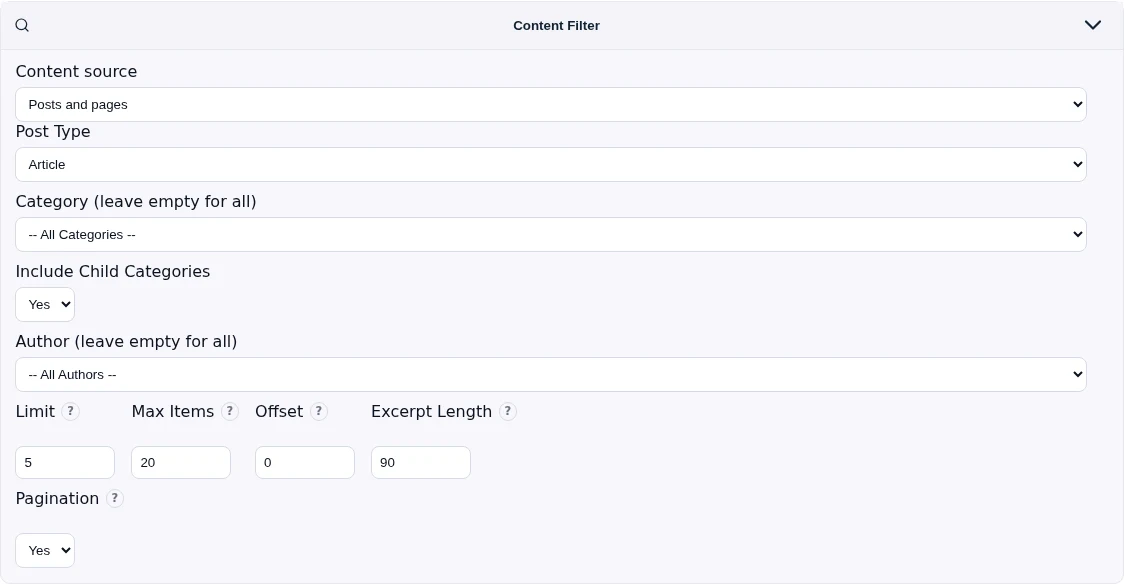
Understanding the four controls
Limit
Limit is the number of items rendered per page. When pagination is disabled, it remains the total number of items rendered by the collection.
Max Items
Max Items caps the number of matching items available across every page. Pagination is offered only when Max Items is greater than Limit. For example, Limit 5 and Max Items 20 can produce up to four pages.
Offset
Offset skips matching items before page 1. An offset of 10 means that the first ten matching records are excluded before the paginated collection begins; it does not mean “start on page two.”
Pagination
Enable Pagination after setting Max Items above Limit. Core first renders normal links, so navigation remains usable without JavaScript, and then enhances those links with AJAX when the browser supports it.
How to configure a paginated Preset
- Open Shortcodes and select an existing Preset or create a new one.
- Choose Posts and pages as the content source.
- Select Article or Page, then apply the intended category, author, date, and ordering filters.
- Set Limit to the desired page size.
- Set Max Items to a value greater than Limit.
- Use Offset only when the collection intentionally needs to skip initial matches.
- Set Pagination to Yes and use Preview with Real Data to verify the result.
- Save the Preset after confirming its layout, empty state, and navigation.
Stable AJAX and browser history
Each paginated collection receives a deterministic query key derived from the effective Preset identity and its supported overrides. Different configurations on one page remain isolated, while repeated instances of the same effective query stay synchronized.
AJAX navigation preserves unrelated query parameters, updates the browser URL, supports the Back button, and returns focus to the updated collection. The ordinary links remain the progressive fallback if JavaScript is unavailable or an asynchronous request fails.
Random ordering without jumping items
A normal random query can reorder every time a page loads. That creates duplicates and omissions when a visitor moves from one page to another. Jyavani solves this by assigning a bounded random seed to the paginated collection. Page transitions and browser history retain that seed, so one browsing sequence keeps one ordering.

A theme may provide a dedicated shuffle action. That action intentionally removes the old page and seed values, producing a fresh sequence while preserving unrelated query state.
Using a Preset from a Theme Section
Preset-backed Theme Sections separate data ownership from presentation ownership. The Preset owns source filters and the Collection Layout. The Theme Section owns its heading, summary, wrapper, and any intentional presentation overrides.
<?= render_shortcode_preset(
    $pdo,
    'featured_articles',
    [
        'layout' => 'grid',
        'limit' => 4,
        'max_items' => 20,
        'pagination' => '1',
    ],
    ['surface' => 'theme_section.home.featured']
) ?>
Runtime overrides are intentionally bounded. They cannot replace protected source ownership, author or creator filters, or date boundaries. This keeps a reusable section from silently changing the query policy stored in its Preset.
Current scope and practical checks
- Core pagination currently applies to the built-in Posts and Pages source.
- A custom source provider remains a single-batch provider unless a separate provider-owned contract implements other behavior.
- Pagination is inactive when Max Items is less than or equal to Limit.
- Test ordinary links, AJAX navigation, browser Back, duplicate Preset instances, and random ordering before publishing a theme integration.
- Keep substantial homepage presentation in registered Theme Sections instead of duplicating Preset queries in template files.
Stable Preset pagination makes larger reusable collections practical without weakening progressive enhancement or query ownership. It also gives theme authors a clean boundary: configure data once in the CMS, then compose it through a presentation layer that remains focused on design.